Electronic Contract Manufacturing Service Provider in California

How to Choose a 4x4 HDMI Matrix Switcher

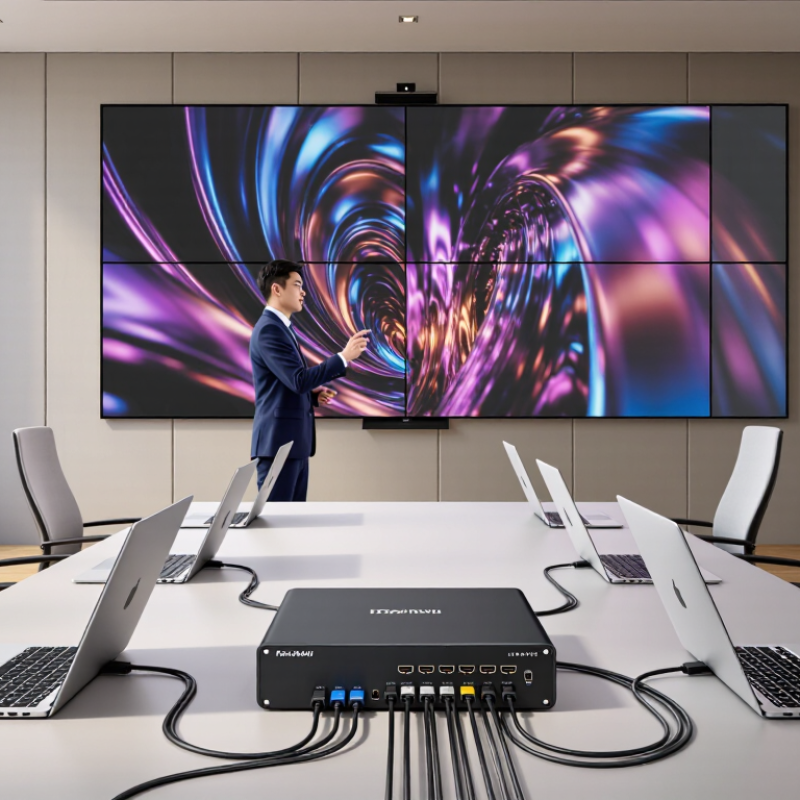
A conference room may have four laptops, four displays, and one presenter changing sources mid-meeting. A 4x4 Hdmi Matrix Switcher can route any of its four HDMI inputs to any of four outputs, independently. That flexibility is useful. But the right model depends on the equipment, distance, and viewing needs—not just the port count.

AVIXA’s 2023 Industry Outlook and Trends Analysis projected professional audiovisual industry revenue would grow from $306 billion in 2023 to $325 billion by 2028. The report reflects a broad industry trend, not a guarantee that every installation needs a matrix. Still, it shows why dependable signal routing matters in workplaces, classrooms, and control rooms. HDMI capabilities also vary: HDMI 2.1 specifies bandwidth up to 48 Gbps, while not every source, display, cable, or switch supports the same features. Check carefully.

This guide explains how to compare resolution and refresh-rate support, HDCP compatibility, audio handling, and control options. It also considers cable runs and whether the system needs reliable switching from a control panel or automation system. A switch can look perfect on paper, then fail to deliver the expected picture across a long cable. Small details count. Choosing well means matching the matrix to the whole signal path, and leaving room to question assumptions before installation.
How to Choose a 4x4 HDMI Matrix Switcher

Understanding What a 4x4 HDMI Matrix Switcher Does

A 4x4 HDMI matrix switcher connects four HDMI sources to four displays, while letting each display select its own source. A source might be a media player, computer, or camera; displays might be televisions in separate rooms. Think of it as a routing desk, not a simple splitter. Not a splitter. This distinction matters when one screen needs a presentation and another needs a live camera feed.

Each output can usually show any connected input, and multiple outputs may show the same input at once. For example, output one could show a laptop while outputs two and three show a media player. The switcher routes the selected signal; it does not improve a weak source or make an incompatible display support higher resolution. Compatibility depends on the whole chain, including cable length, resolution, refresh rate, and supported copy-protection features. A mismatch can cause a blank screen, flicker, or lower-than-expected picture quality. Small detail, big impact.

Before choosing a unit, map the room: label each source and display, then note which combinations people need. Check whether audio must travel with video, and whether remote control or automated switching is required. Specifications should list supported formats, but real installations can still behave differently with long cables. Cable runs are easy to overlook; measuring them early is less glamorous, but useful.

Identifying Your HDMI Sources and Display Requirements

How to Choose a 4x4 HDMI Matrix Switcher

Identifying Your HDMI Sources and Display Requirements

Start with a clear inventory of the devices you plan to connect. List media players, computers, game consoles, cameras, and any shared presentation equipment. Include devices used only occasionally; they are easy to forget. Check each cable. Record every source’s maximum resolution, refresh rate, and audio format. A single older device may affect how signals are handled across the system.

Next, note the capabilities of all four displays, not just the newest one. Write down their supported resolutions, refresh rates, and HDR formats, along with the distance from the matrix to each screen. A 4K display running at 60 Hz has different needs from a 1080p projector or a 4K screen requiring 120 Hz. Check that the matrix supports the formats your sources and displays share. Long cable runs may also need suitable active cables or signal extension.

Think about how people will use the setup. Do several rooms need different sources at the same time, or will every screen show one program? Confirm that the matrix can route each input independently if needed. Audio deserves a check too: displays and receivers may handle formats differently. Even a careful inventory can miss a rarely used laptop or a future display, so leave some room for changing requirements rather than matching every specification too tightly.

Checking Resolution, Audio, and Compatibility Specifications

How to Choose a 4x4 HDMI Matrix Switcher

Checking Resolution, Audio, and Compatibility Specifications

A 4x4 matrix routes four sources to four displays, but the number alone says little about picture quality. Check the maximum resolution and refresh rate for every output path. A unit marked “4K” may only support 4K at 30 Hz, or reduce color detail at 60 Hz. For gaming or detailed desktop text, confirm 4K at 60 Hz and 4:4:4 chroma across all four outputs. The HDMI Forum’s HDMI 2.1 specification allows up to 48 Gbps, but a matrix’s actual bandwidth depends on its design. Read the fine print.

Audio needs equal attention. Check whether the switcher passes the formats your receiver or soundbar decodes, including multichannel PCM or compressed surround sound. ARC and eARC support can matter when audio returns from a display. Don’t assume every output handles audio identically. A specification sheet can leave gaps.

Compatibility includes HDCP version, EDID controls, and cable distance. These details affect whether a source negotiates a usable picture. The CTA’s 2024 U.S. Consumer Technology One-Year Industry Forecast estimated U.S. consumer technology retail revenue at $512 billion; that broad market figure is not a performance test, but it reflects a crowded mix of devices. Check the exact source and display models. Small mismatches can cause blank screens. It happens.

Comparing Routing, Control, and Installation Features

Routing determines whether a 4x4 matrix fits the room’s actual use. In a meeting space, four laptops may feed four displays independently, or one presentation may need to appear everywhere. Check for both independent switching and one-to-many routing. Picture a presenter moving from a front screen to a confidence monitor; switching should not interrupt the image. That matters. Confirm supported resolutions and audio handling, too. A matrix that routes video but mishandles embedded audio can create confusing silence.

Control affects daily use more than a long feature list suggests. Front-panel buttons are useful during setup, but a touch panel or control system may suit regular operation better. Look for clear input and output labels, saved presets, and reliable status feedback. If control uses a network or serial connection, confirm how it will connect to existing equipment. Check this. A phone app alone may not be enough when the network is unavailable.

Installation details can change the choice. Measure rack space, allow airflow, and verify that cable runs stay within the device’s stated limits. Check connector access before mounting; a snug cabinet can make routine changes awkward. Confirm EDID and HDCP behavior with the displays and sources you plan to use. A spec sheet can hide a small compatibility snag. Test the full signal chain before final installation, even if the room looks simple.

How to Choose a 4×4 HDMI Matrix Switcher

Compare routing flexibility, control options, and installation requirements before choosing a switcher.

Routing: A 4×4 matrix has four inputs and four outputs. If each active output can independently select any input, the number of possible routing maps is 4n, where n is the number of active outputs. The chart assumes duplicate sources are allowed.

Control: Check which control methods you need, such as front-panel buttons, an IR remote, RS-232, or LAN control. Installation: Confirm rack and ventilation requirements, cable distances, and compatibility with the HDMI, HDCP, and EDID requirements of your sources and displays.

Evaluating Reliability, Support, and Total Cost

A 4x4 HDMI matrix should be judged by how steadily it works in the actual room, not just by its feature list. During a site test, switch all four sources repeatedly and watch for black screens, delayed audio, or different results across displays. Check support for the resolutions, refresh rates, and audio formats your equipment uses. Heat matters, too: a unit tucked into a crowded cabinet may behave differently from one on an open shelf. Small details matter. Ask whether firmware updates, clear setup instructions, and a published warranty are available. A quick demonstration is useful, but it cannot prove years of reliability.

Support can affect the cost of ownership as much as the purchase price. Before buying, ask how support handles troubleshooting, replacement parts, and warranty claims. A specific response time is more useful than a vague promise of help. Calculate the full cost, including cables, control accessories, installation, and any service plan. If a lower-priced switcher requires extra equipment or repeated setup visits, the savings may disappear. I would still avoid paying more for features the system will never use; that judgment can be imperfect when future displays are uncertain. Compare documented capabilities with your current setup, and leave room for realistic upgrades.

How to Choose a 4x4 HDMI Matrix Switcher - Evaluating Reliability, Support, and Total Cost

Evaluation Area What to Check Practical Benchmark or Evidence Priority
Matrix routing Confirm that the unit has four HDMI inputs and four HDMI outputs, and check whether each output can select its input independently. A 4x4 matrix is designed to route sources to displays; confirm the supported routing combinations and whether simultaneous output of the same source is allowed. Essential
Resolution and bandwidth Match the switcher’s supported formats to the sources, displays, and cables in the installation. For 4K at 60 Hz with 4:4:4 color, HDMI 2.0-class bandwidth is commonly specified at up to 18 Gbps. Check the manufacturer’s format table for the exact supported color depth and chroma format. Essential
HDCP compatibility Check the HDCP versions supported by the matrix and confirm compatibility with all connected sources and displays. HDCP requirements vary by content and equipment. A mismatch can prevent protected content from displaying, so verify the complete signal chain rather than relying on a single version label. Essential
EDID management Look for selectable or manageable EDID modes and a clear way to handle displays with different capabilities. EDID communicates display capabilities to a source. Useful controls can help avoid a source choosing a format that one or more connected displays cannot support. High
Reliability and thermal design Review operating-temperature limits, ventilation requirements, power supply details, and installation guidance. Check the published specifications and warranty terms. Allow the clearance recommended by the manufacturer and avoid enclosing equipment without adequate ventilation. High
Control options Confirm that local controls and any required remote-control, serial, or network interfaces suit the installation. Check which control methods are included, which require additional equipment, and whether the control protocol is documented for the intended automation system. High
Support and warranty Verify the warranty period, support availability, return process, and access to setup instructions and firmware information. Prefer written warranty terms and accessible technical documentation. Confirm who handles troubleshooting and replacement before purchase. High
Installation requirements Check the unit’s dimensions, mounting method, power requirements, connector access, and cable-length guidance. Use cables rated for the required data rate and installation distance. Long or in-wall runs may require a suitable active or optical solution, depending on the system. Medium
Total cost of ownership Include the switcher, suitable cables, mounting hardware, control accessories, installation labor, and likely support or replacement costs. Compare the complete installed cost, not just the purchase price. A lower-priced unit may cost more overall if it needs extra accessories or repeated troubleshooting. High
Final evaluation Score each candidate against the same requirements and identify any unsupported format or control feature before buying. A useful comparison gives the greatest weight to signal compatibility, reliable operation, and support; then compares the full installation cost among products that meet those requirements. Decision

Specifications vary by model. Confirm supported video formats, HDCP behavior, control interfaces, and warranty terms in the product documentation before purchase.